
Introduction
The NxLib API is built around a JSON-based tree structure that holds all camera parameters, data and the NxLib’s own state. A small set of C functions (wrapped by interfaces for different programming languages) reads and writes the nodes of this tree. Commands provide higher-level functionality on top of the tree, such as opening a camera or computing point clouds.
JSON Tree
The tree is rooted at /. Its top-level nodes include /Cameras (one node per discovered camera, containing its parameters and data), /Execute (the node through which commands are executed) and a few others, all documented in the tree reference. Nodes are addressed by their path in the tree, e.g. /Cameras/<SERIAL_NUMBER>/Parameters/Capture/Exposure, and can hold the data types known from JSON plus an NxLib-specific way to store binary data (see the data types page).
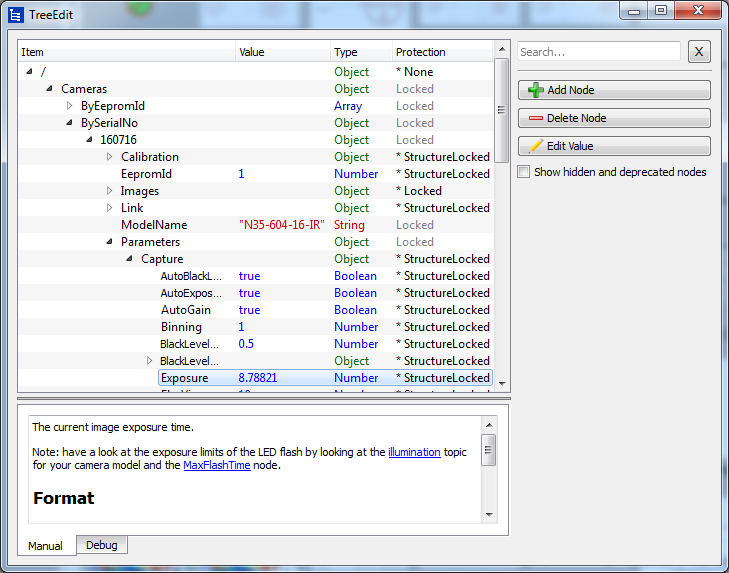
An example of the JSON tree structure as displayed in NxTreeEdit, with one camera node unfolded.
Commands
Commands are executed through the /Execute node: the command name and parameters are written to an execution slot, a separate thread executes the command, and the result is written back to the tree. Most language wrappers provide an NxLibCommand class that automates this procedure. The commands reference documents all available commands.
The following pages teach you how to use the API:
Language Interface Setup — how to set up the interface for your programming language
First Program — initializing the NxLib, opening a camera, generating 3D data
Basic Operations — reading and writing nodes, waiting for values, JSON conversion, handling API errors
Command Execution — executing commands and handling command errors
Remote Access — opening a port for remote access and connecting to a remote NxLib instance